


STARZ
4.458.17K Reviews
App Specs
- Version
- 6.9.0
- Updated On
- License
- Free
- Downloads
- 10,000,000+
- Developer
- Starz Entertainment, LLC
- Categories
- Entertainment
- Platform
- Android, iOS
Screenshots

 Analysis by AppCompare
When I judge a streaming app, I look beyond how quickly it gets me to a show. I also want to understand who runs it, what choices are visible, and whether the service suits the way I actually watch. STARZ is an entertainment app from Starz Entertainment, LLC, built around films and series rather than the broad mix of live channels, user videos, and other formats found in some competing services. Its focus is appealing when I want a deliberate night of scripted entertainment, though it also means it is not the best single app for every kind of viewing.
What the service is—and what its scale tells me
The app is free to download, but that should not be confused with free access to its full entertainment offering. In-app purchases range from $0.49 to $69.99 per item, so I would check the purchase details shown in the app or store before committing to anything. The app itself has a 4.4 average from around 178,000 ratings, and it has passed 10 million installs. Those figures suggest that plenty of people use it, but popularity alone cannot tell me whether its catalogue or viewing terms fit my household.
It is a Teen-rated entertainment app, which is useful context for families, but I would not treat that label as a substitute for checking an individual title. The service’s appeal rests on its particular collection of series and movies, and a household that shares a screen may want to decide together what is suitable. I find that more useful than assuming every title in one streaming app has the same tone simply because it is in the same catalogue.
Trust starts with the choices I can actually see
For a subscription-style entertainment service, my practical trust test is straightforward: I want to know what I am selecting, what a purchase costs, and where I can manage an account or stop paying if I no longer want the service. I would review the purchase confirmation carefully, use the account controls available through the channel where I signed up, and keep track of whether a subscription is active. Those are sensible habits for any streaming app, not a claim that STARZ offers a particular cancellation route or privacy control.
I also avoid assuming that a familiar login screen tells the whole story about data handling. Before entering payment or account details, I read the current privacy and subscription information presented through the app or the relevant store. If I am installing it on a shared tablet, I consider who can access the signed-in account and whether the device itself is protected. These small checks matter most when a screen is used by more than one person or when payment details are attached to an account.
First Impressions: A Smooth Start
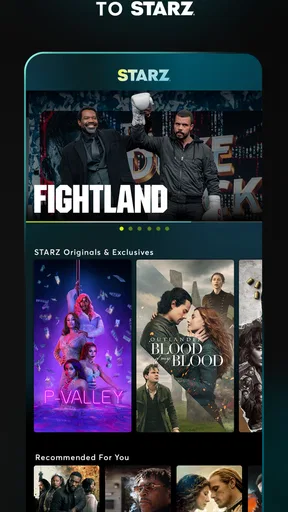
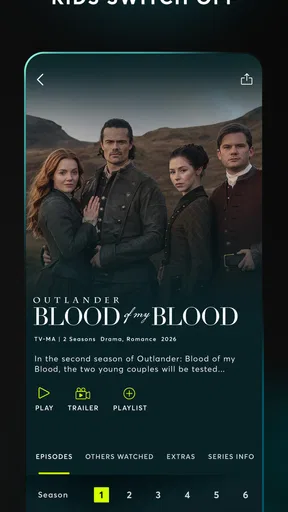
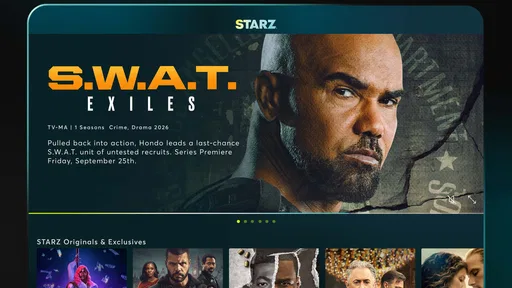
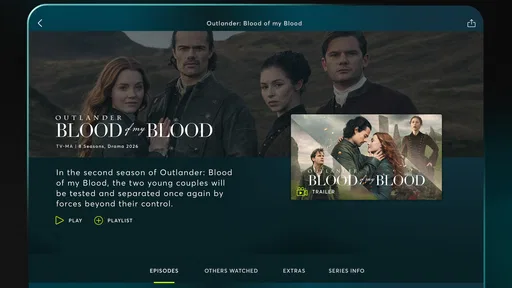
The first thing I noticed about the STARZ app was its sleek and user-friendly interface. It’s got that dark theme that’s easy on the eyes, perfect for those late-night sessions when you just want to watch "Outlander" without burning your retinas. Signing up was a breeze. I just entered my email, created a password, and I was all set to explore.
Diving into the Content
Now, let's talk content because that's what we're here for, right? STARZ offers a mix of original series, popular TV shows, and a hefty collection of movies. From "Power" to "American Gods," the selection is pretty impressive. I love how they categorize content, making it easy to find what you’re in the mood for. Whether it’s drama, comedy, or fantasy, there’s something for everyone.
Worth Reading Before You Choose

EA SPORTS FC Mobile 26 Is a Bigger Football Game, but It Takes Time

Flipboard Shows What News Apps Must Do Beyond the Feed

Switching to Android Auto Means Rethinking Your Driving Routine

Google Calendar Makes a Crowded Week Easier to Manage

Ludo King Makes the Most of the Minutes Between Plans

Baby Panda World Brings Quick Play to Modern Phones, but Its Game Library Feels Busy
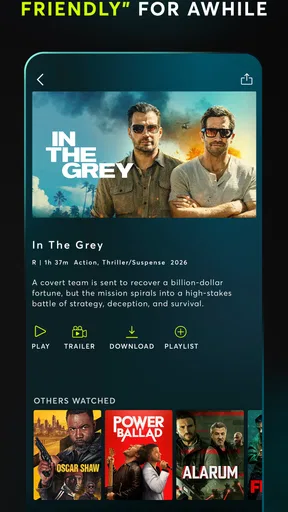
One feature I particularly enjoyed is the ability to download episodes and movies for offline viewing. This is a lifesaver for those long commutes or when you're stuck in a Wi-Fi-less zone. The quality of the downloads impressed me too; it was like having a mini cinema in my pocket.
Making the catalogue work for your evening
My most useful approach is to decide what kind of watch I want before browsing: a continuing series when I have several evenings free, or a film when I only have one stretch of downtime. That simple distinction helps me avoid scrolling through a catalogue without choosing anything. If I am watching with someone else, I search for a title we both want rather than relying on broad genre labels; a category can narrow the field, but it cannot predict what either of us will enjoy.
Offline viewing is especially valuable when I can plan ahead. Before a commute or a trip, I would choose an episode or film while connected, start its download, and confirm it is ready before leaving. That is a better workflow than waiting until I have no connection and expecting the app to rescue the evening. Downloads also use device storage, so I would remove items I have finished instead of letting a queue quietly fill the space I need for photos or other apps.
That convenience has a trade-off: a download is most useful when I know what I want to watch, while browsing is easier when I am online. I would not treat offline access as a replacement for planning, especially for a longer journey where I need enough entertainment for the whole trip. A short test download at home can also reveal whether the chosen device has enough room and whether the file is available before I rely on it away from Wi-Fi.
Performance: Smooth Sailing or Rocky Waters?
In terms of performance, the app is pretty solid. Videos load quickly, and I didn’t experience any buffering issues, which is crucial when you’re dying to know what happens next in "The Spanish Princess." The streaming quality is top-notch, offering HD and even 4K options depending on your device's capability.
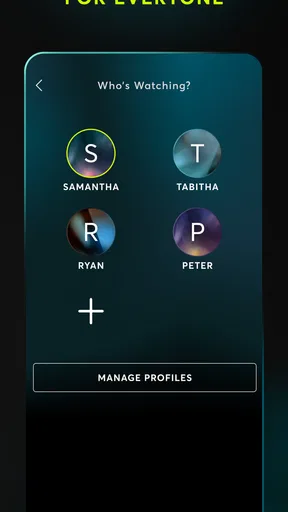
Navigation is intuitive. I could easily switch between profiles, browse through genres, and find what I wanted without any hiccups. The search function is efficient too, bringing up relevant results even if my spelling was a bit off (I blame my excitement!).
Choosing a screen and connection sensibly
For everyday use, I would match the viewing plan to the connection rather than assuming every network behaves the same. At home, I can settle in for a longer stream; on a mobile connection, I would think about data use and whether a planned download is more sensible. I also treat picture quality as a balance: a sharper option is only useful if my device and connection can handle it comfortably. The practical goal is a steady, enjoyable watch, not selecting the highest setting by reflex.
If playback or sign-in behaves differently on a particular device, I would first check the basics: whether the app is current, whether the connection is stable, and whether I am using the intended account. The current version is 6.5.0, and the stated minimum operating-system requirement is Android 5.0. Those details are helpful when deciding whether an older Android device is a reasonable place to install it; they do not guarantee that every device will perform identically.
How it fits beside other streaming choices
Compared with a broad general-purpose streaming service, STARZ makes more sense when its particular selection is the reason I am opening an app. A larger all-in-one service may be more convenient for a household that wants children’s viewing, reality programming, documentaries, and many other formats under one roof. A free, ad-supported service may suit someone who values avoiding a recurring subscription more than choosing a focused catalogue. STARZ is a better fit when I want its film-and-series offering and expect to use it enough to justify the cost.
I would also think about what I already pay for before adding another service. If I only want to watch one title, a short period of access may be more sensible than keeping a subscription indefinitely, but I would check the current terms and manage any sign-up through the account or store that handled it. If I prefer to have every show from several services in one place, switching between apps may feel like needless friction. The right choice depends less on a universal ranking and more on whether the titles I want are here.
Pricing: Is It Worth It?
Let’s talk dollars and cents. STARZ offers a free trial period, which is a great way to test the waters without commitment. After that, their subscription model is competitively priced. Considering the quality and breadth of their content, I’d say it’s a good bang for your buck.
"I found myself hooked on more than one series, making it a valuable investment in my entertainment budget."
Another thing worth mentioning is the lack of ads. Yes, you heard right—no annoying interruptions. This alone is a huge plus in my book, as it keeps the binge-watching experience seamless and immersive.
Keeping control of the account and spending
Because purchase options can vary in amount, I would pause at each confirmation screen and make sure I understand whether I am starting access, renewing it, or buying something else. I would not rely on memory to track a subscription: noting the renewal date shown at sign-up and checking the account that manages the payment are simple ways to stay in control. If I signed up through a mobile store, I would look there for subscription management; if I used another route, I would follow the account instructions attached to that route.
For a shared device, I would sign out when appropriate and avoid leaving payment choices open to someone who should not make them. That is particularly relevant in a home where adults and teens use the same tablet or television. The Teen content rating gives a general age signal, while household rules and title-by-title decisions still belong to the people responsible for the device.
Who will enjoy it, and who may not
I would recommend trying STARZ to someone who already has a few specific series or films in mind, enjoys watching episodes in sequence, and appreciates having offline viewing available for planned trips. It also suits a viewer who wants a focused entertainment option instead of searching a very broad library every time. The service is less compelling for someone who watches only occasionally, is trying to reduce subscriptions, or expects one app to cover every person and genre in a busy household.
A realistic use case is a weeknight when I have a free hour after dinner: I can browse for a series, watch an episode, and continue later if I get invested. If I know the next day includes a train ride, I can prepare a download beforehand rather than depend on the journey’s connection. That combination of at-home streaming and planned offline access is a genuine strength, as long as I am comfortable with the service’s cost and catalogue.
Final Thoughts: To Download or Not to Download?
So, what's the verdict? If you’re a fan of high-quality, ad-free streaming with a diverse selection of shows and movies, the STARZ app is definitely worth checking out. It’s easy to use, performs well, and offers content that will keep you entertained for hours on end.
In a world where streaming services are a dime a dozen, STARZ stands out for its unique offerings and user-friendly experience. Whether you're in it for the original series or the blockbuster movies, there’s plenty to keep you coming back for more. So go ahead, hit that download button, grab some popcorn, and let the binge begin!
My cautious verdict
Released on May 6, 2013, this entertainment app has had time to build a substantial audience, but its value for me still comes down to current taste and viewing habits. I would install it when I have a clear reason to explore its catalogue, check the terms before paying, and decide after watching whether I would use it regularly. That feels more reliable than choosing a streaming service just because its name is familiar or its audience is large.
Overall, I see STARZ as a focused option rather than a universal streaming hub. Its offline downloads, straightforward browsing, and selection of series and movies make it easy to picture in a regular routine, while the extra cost and need to manage another account are real considerations. If the titles appeal to you, it is worth exploring; if you need the widest possible variety or want to keep spending to a minimum, another kind of service may be a better match.
Pros
- User-friendly interface enhances navigation.
- High-quality streaming ensures clear visuals.
- Wide selection of movies and TV shows.
- Offline download option for convenience.
- Regular updates with new content.
Cons
- Subscription required for full access.
- Limited availability in some regions.
- Occasional buffering on slower networks.
- Some content may not be family-friendly.
- No free trial without credit card info.
FAQs for STARZ
What content is available on the STARZ app?
The STARZ app offers a wide range of original series, movies, and documentaries. Users can access exclusive STARZ Originals, popular Hollywood films, and more. The app frequently updates its library, so there's always fresh content to explore. Subscribers can also download content for offline viewing, providing flexibility in how and when they watch.
How does the STARZ app subscription work?
The STARZ app requires a subscription to access its content. Users can choose between a monthly or annual plan. New users typically have access to a free trial period, allowing them to explore the app's features and content before committing. Subscription renewals are automatic but can be canceled at any time through account settings.
Is the STARZ app available on multiple devices?
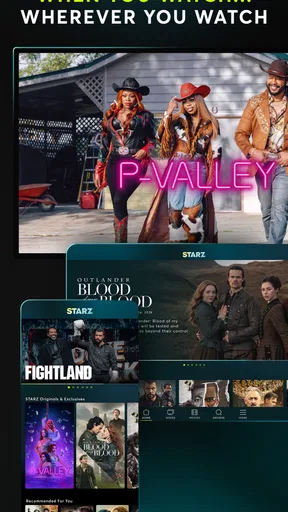
Yes, the STARZ app is compatible with a wide range of devices, including smartphones, tablets, smart TVs, and streaming devices like Roku and Amazon Fire Stick. Users can log in with their account on multiple devices, enabling them to start watching on one device and continue on another seamlessly.
Does the STARZ app offer parental controls?
The STARZ app includes parental control features that allow parents to restrict access to certain content based on ratings. This ensures that children cannot access inappropriate content. Parents can set up a PIN to manage these restrictions effectively, providing peace of mind while using the app in a family setting.
Are there any additional features in the STARZ app?
Aside from streaming and downloading content, the STARZ app features personalized recommendations based on viewing habits. It also allows users to create multiple profiles, each tailored to individual preferences. The app offers a user-friendly interface, making it easy to navigate through genres, new releases, and STARZ Originals.


